SBOU187A april 2017 – april 2023
- Abstract
- Trademarks
- 1Overview
- 2INA233EVM Hardware
- 3INA233EVM Hardware Setup
-
4INA233EVM Software Overview
- 4.1 Starting the INA233EVM Software
- 4.2 Configuring the INA233EVM Software
- 4.3 Using the INA233EVM Software
- 5INA233EVM Documentation
- 6Revision History
3.4.1 System Power Up
Launch the INA233EVM GUI software. By default the Power button on the GUI is enabled so the VS LED on the EVM (D1) immediately lights up, indicating that the EVM PCB is receiving power, as shown Figure 3-5.
 Figure 3-5 INA233
Power Up Using SM_USB DIG and INA233EVM GUI Software
Figure 3-5 INA233
Power Up Using SM_USB DIG and INA233EVM GUI SoftwareThe INA233EVM software allows users to customize the board level voltage, regulated by the SM-USB DIG. By selecting either 3.3 V or 5 V, the user can designate which voltage the device operates at. The supply voltage (VDUT) is set to 3.3 V by default, but if necessary, the 5-V option can be selected, as shown in Figure 3-6.
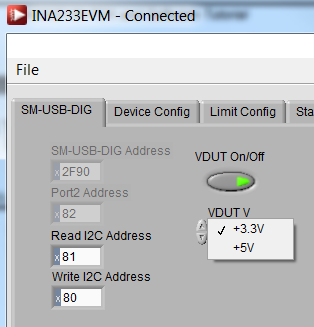 Figure 3-6 VDUT
Voltage Selection in INA233EVM GUI
Figure 3-6 VDUT
Voltage Selection in INA233EVM GUI